Hermes Agent
Install the RedPanda CLI and skill on Hermes Agent (Telegram, Discord, Slack and etc.).
Connect your agent today
Draft from chat, review in your calendar, and publish only what you approve.
Prerequisites
- Shell access on the host where Hermes runs terminal commands (local machine, Docker, SSH, Daytona, or Modal).
- A working Hermes chat before adding skills — run hermes and confirm the agent responds.
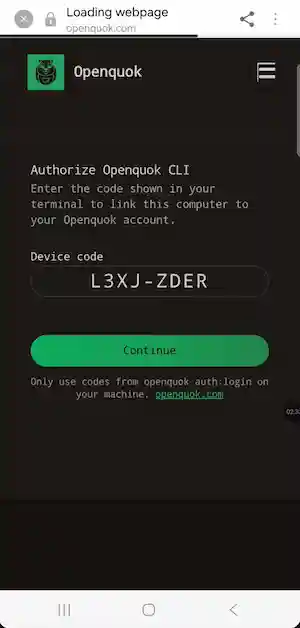
- For OAuth device login: you can authorize the sign-in link on your phone when the agent asks you to log in.
Installation
Install Hermes Agent
On Linux, macOS, WSL2, or Android (Termux):
curl -fsSL https://hermes-agent.nousresearch.com/install.sh | bash
source ~/.bashrc   # or source ~/.zshrc
On native Windows (PowerShell):
iex (irm https://hermes-agent.nousresearch.com/install.ps1)Then choose a provider — fastest path with Nous Portal:
hermes setup --portalOr run hermes model to pick Anthropic, OpenRouter, OpenAI, Gemini, or a custom endpoint. See the Hermes quickstart for provider tables and troubleshooting.
Connect a messaging gateway (optional)
After CLI chat works, connect Telegram, Discord, Slack, WhatsApp, or another platform:
hermes gateway setupCheck status with hermes gateway status. Messaging is optional for RedPanda — the agent can draft and schedule from the terminal alone.
Install the global RedPanda CLI
In the same environment Hermes uses for shell tools:
npm install -g @openquok/auto-cli@latest
openquok --version
Production auth uses the API at https://YOUR_CLI_AUTH_SERVER and opens the browser on https://web-production-ce4be0.up.railway.app/cli/device/verify.
CLI version update
Installing a skill or restarting Hermes does not change openquok --version. You need to update it yourself by running npm install -g @openquok/auto-cli@latest
Install the RedPanda Core skill
The skill file lives at agent/skills/openquok-core/SKILL.md in the monorepo. Hermes loads skills from ~/.hermes/skills/. Choose one install path:
Start a new Hermes session after install so skill descriptions reload. You should see ~/.hermes/skills/openquok-core/SKILL.md on disk. In the Hermes CLI, hermes skills list or /reload-skills confirms the skill is loaded.
Authenticate
Recommended (Telegram / messaging): device OAuth in two CLI steps — Hermes stops the shell after the first JSON from auth:login --json, so credentials are never stored unless you use --no-poll and a follow-up poll:
openquok auth:login --json --no-poll
# open verification_uri_complete on your phone → Authorize → tell the agent you're done
openquok auth:login:poll --device-code "<device_code from stdout>"
openquok auth:status
Alternative for fully headless hosts (VPS, Docker, Telegram bots): rotate a programmatic token from the RedPanda dashboard (Account → Settings → Developers → Access):
export OPENQUOK_API_KEY=opo_your_programmatic_token
openquok auth:status
Confirm the agent can run commands
After auth:
openquok integrations:listHermes + messaging notes
- Start a new chat session after installing the skill or upgrading the CLI so Hermes reloads skills and checks openquok --version once at session start.
- If the agent reports an old CLI version after you upgraded, run command -v openquok and which -a openquok — another binary may be earlier on PATH.
- Hermes separates secrets (~/.hermes/.env) from config (~/.hermes/config.yaml). export OPENQUOK_API_KEY in your shell profile before starting hermes gateway.
- On Telegram, use auth:login --json --no-poll then auth:login:poll after you authorize on your phone — not auth:login --json alone.
- For posting with images in chat, the user must provide a file or an image URL for upload-from-url.
Real World Use case: Chat model vs image generation
Hermes uses two separate systems:
| Role | Configured via | Example |
|---|---|---|
| Main chat (Telegram, CLI, scheduling) | hermes model → model.default in ~/.hermes/config.yaml | claude-sonnet-4-6 |
| Image generation (on demand) | hermes tools → image_gen in config.yaml | fal-ai/nano-banana-pro via the image_generate tool |
Do not set an image-only model (for example gemini-3-pro-image) as your main Telegram model. Hermes will fail with Provider authentication failed.
Warning
Pick a capable chat model for model.default (for example claude-sonnet-4-6 on provider anthropic). Configure image generation separately under image_gen — the agent calls image_generate when the user asks for a picture, without changing the main model.
Set the main chat model
hermes modelPick Anthropic and a chat model such as claude-sonnet-4-6. The terminal handles credentials for you:
- OAuth — Claude Max plan with extra usage credits (Hermes routes as Claude Code; see the AI Providers guide).
- API key — paste your key when prompted. You can also run hermes auth add anthropic --type api-key or hermes config set ANTHROPIC_API_KEY sk-ant-... (saved to ~/.hermes/.env).
- Claude Code — if you already use Claude Code on the host, Hermes can auto-detect those credentials.
Hermes writes the result to ~/.hermes/config.yaml:
model:
  provider: anthropic
  default: claude-sonnet-4-6
If you use hermes setup --portal (Nous Portal) or OpenRouter instead, pick anthropic/claude-sonnet-4.6 with provider: nous or provider: openrouter — no separate Anthropic API key needed on Portal.
In an existing session you can switch with /model claude-sonnet-4-6 (native Anthropic) or /model anthropic/claude-sonnet-4.6 (aggregator).
See Configuring models and AI Providers for provider tables and auxiliary overrides.
Configure image generation
Image generation is not part of the RedPanda skill. Set it up once:
hermes toolsOpen Image Generation, choose a backend:
- Nous Subscription — if you use hermes setup --portal (no separate FAL key).
- FAL.ai — add FAL_KEY to ~/.hermes/.env (get a key at fal.ai).
Pick your image model. For Gemini-class quality and text in images, a common choice is fal-ai/nano-banana-pro. For speed and low cost, the default fal-ai/flux-2/klein/9b is fine.
Hermes saves the selection to config.yaml:
image_gen:
  model: fal-ai/nano-banana-pro
  use_gateway: false
Set use_gateway: true when using Nous Subscription instead of a direct FAL key.
Then ask in Telegram or the CLI:
Generate a square image of a product hero shot on a clean white background
Hermes routes that to image_generate using the configured image_gen.model — your main chat model stays on Sonnet.
Full model list, aspect ratios, and editing: Hermes image generation.
Auxiliary models (optional)
Hermes can route side tasks (vision analysis, session titles, context compression) to a different model than main chat. Run hermes model → Configure auxiliary models, or edit the auxiliary: block in config.yaml.
Run on a VPS or serverless host
Hermes supports six terminal backends: local, Docker, SSH, Daytona, Singularity, and Modal. Mount a persistent ~/.hermes/ volume (or set HERMES_HOME), install openquok-core and the global CLI in the container shell, then authenticate.
On headless hosts prefer OPENQUOK_API_KEY or auth:login --json so the user opens verification_uri_complete on another device. See the Hermes installation guide for per-user vs root layout and service-account installs.
Troubleshooting
Outdated skill or CLI
Installing or updating the skill does not upgrade openquok --version. Run both updates in the same shell environment Hermes uses for terminal tools, then start a new chat session so Hermes reloads skills and the RedPanda bot runs its opening checks again.
On the host (terminal)
hermes skills update openquok-core
npm install -g @openquok/auto-cli@latest
openquok --version
In Telegram (or another messaging gateway) — slash commands run in the chat, not in the shell:
/new
Starts a fresh conversation (alias /reset). Use this after upgrading so the RedPanda skill re-reads openquok --version and auth:status on the first turn.
/sessions
Lists recent sessions so you can resume an older thread or confirm you are not still in a pre-upgrade chat. You can also run /resume <name> to jump to a named session. In the Hermes CLI, /reload-skills reloads skill metadata without a full reset when you only changed the skill file.
Skill not found
Confirm ~/.hermes/skills/openquok-core/SKILL.md exists. Install with hermes skills install (see Install the RedPanda Core skill) or update an existing copy with hermes skills update openquok-core. Start a new session — in Telegram send /new — then run /skills or hermes skills list to confirm the skill is loaded.
Invalid or expired code
The user must open the exact verification_uri_complete link from auth:login --json while the CLI is still polling. Codes expire in about 15 minutes. Pre-login at openquok.com alone does not validate the device code.
Warning
If Telegram shows Provider authentication failed while CLI chat works, the gateway is usually on a model your provider does not expose for chat (for example gemini-3-pro-image). Run hermes model and set a chat model such as claude-sonnet-4-6. Use hermes tools → Image Generation for pictures — see Chat model vs image generation above.